This is a single-chip pocket calculator from 1976. It’s probably the most basic actual calculator in existence or ever built, because of how it works and its very low specs. It’s integer-only, has only six digits on its display and uses RPN – Reverse Polish Notation. This means you put in the numbers first, hence the ENTER key, then the operation, so for example 4-3 would be typed in as 4 <ENT>3<ENT>-<ENT>. There is notably no “=” key because it isn’t necessary. I don’t know if you could put in a series of numbers and have the machine work its way through them, but two advantages of this method are that you don’t need to worry about priority (BODMAS – Brackets, Division, Multiplication, Addition, Subtraction – the order in which you work out the calculation) and you don’t need brackets because of the absence of priority.
This calculator is so simple that I could almost design it myself. However, since I set my aim even lower, if I designed it, it would be octal or hex rather than decimal. I remember this calculator being reviewed in ‘Which?’ magazine and thinking two things:
- It’s crap, and
- I could do that.
The fact I can remember that review and had that thought suggests it was on the market for a number of years.
The big difficulty would be how to implement division. Division is often achieved by shifting and adding if I recall correctly, just as multiplication is achieved by that method but in the opposite direction. Multiplication is shifting to the left, i.e. to more significant bits, and division shifts to the right, i.e. to less significant ones. If a bit got shifted past the most significant bit in the register holding the result, it would activate the overflow flag and the letter “E” would presumably show on the display.
This “Mathbox” has something in common with the ZX81. Although the home computer in question was very primitive, it was also technologically advanced in terms of hardware because in its basic form it had only five chips, as opposed to the ZX80 which had twenty-one. A ZX80 is upgradable to a ZX81 simply by changing the system software, so all those chips are functionally equivalent in the two machines. However, this is only possible because of the low system specs. It has 1K of RAM, so it uses 2 x 2114 static RAM chips, each storing four bits, and all the discrete logic (integrated circuits) are bundled together into the Uncommitted Logic Array. It also uses system software to generate the screen for three-quarters of the time, so it’s very slow, although the 1802-based COMX 35 which came out two years later was even slower, probably because the 1802 CPU is bloody weird. So there’s a trade-off between what can be done cheaply with the technology available at the time and the low specifications which make that possible at all, driving down manufacturing costs. The Mathbox has a single integrated circuit inside which isn’t even set in a neat rectangular or square package but is just in a blob, which apparently is also the case in the Furby, but this makes it cheap. The only other component was a resistor.
One thing I don’t understand about old pocket calculators is whether they performed more advanced mathematical functions in hardware or software. Integer addition and subtraction is straightforward and can easily be done with a few logic gates plus the convention that half of the numbers available are understood to be representations of negative numbers, which allows subtraction to be carried out by complementary addition. This is also achievable by inverting the bit pattern. Likewise, if there’s no exponent notation or representation involved, “floating” point numbers can be added and subtracted as if they’re fixed point or integer numbers. A fixed point number is something like a monetary value in pounds and pence or dollars and cents: it doesn’t really have a decimal point but you can just pretend it has. You might think you’re working out £89.95 plus fifteen percent VAT (£13.49 rounded down, £13.50 rounded up) but really you’re just adding 8995 and 1350.
One odd thing about this Mathbox, and in fact many calculators, is that they seem to use Binary-Coded Decimal (BCD) rather than actual binary, which is literally a bit of a waste of space in some ways. I shall explain. In binary, the integer 170 is 10101010 and 85 is 01010101. These are easy to remember because they alternate ones and zeros and are complementary. In BCD, each nybble (four-bit value) is confined to the integers between zero and nine, so one is 0001 and so on up to nine, which is 1001. This makes 85 10000101 in this system, and also gives 170 twelve bits as it would be 000101110000. This calculator has six figures, meaning it can represent integers up to 999 999, which is twenty-four bits of BCD, but two dozen bits can represent values up to 33 554 431, so the power of the device is somewhat curtailed. This curtailment also makes the design of the hardware more complex in terms of actual calculations, but easier in terms of producing a display. With an eight-figure display the discrepancy is greater, and with a ten-digit one greater still. A similar handicap also occurs with the use of standard form, which tends to run up to 99 places either side of the decimal point, when it could go up to 255. Moreover, using hex or octal wouldn’t induce this problem, so although it might be harder to read, the calculator would be more powerful and somewhat faster.
That’s the real Mathbox then, and it is the size of a matchbox. Coincidentally, the ZX81 was nicknamed a “matchbox”, because it was oddly small for the time and also rather featureless. Such devices are much more common today, such as the Raspberry π and the relatively minute stick PCs which come along from time to time. There’s also the Intel Compute Stick and the Gigabyte Brix GB-BACE-3160, whose 56.1 mm x 107.6 mm x 114.4 mm dimensions I find oddly appealing.
Although they can be said to be boxes which do maths, they don’t visibly do what most people tend to think of as maths. For instance, they decompress video imagery and I imagine have some kind of 3-D hardware acceleration, but although they could do so via an application, they generally wouldn’t respond to someone typing in formulas and equations on a keyboard.
I’d like to talk about two experiences of mine which probably say more about me than anything else, but which illustrate my preferences quite well. In 1968, a statistical software package was released called SPSS, which aimed to automate batch processing of statistical data. When I studied statistics as part of my first degree in ’85/’86, it was fairly usable, with a command line and a strong connection to the equations I held in my head for many different statistical tests. I then dropped out of psychology, mainly in fact due to the emphasis it placed on statistics which still seems totally wrong-headed to me, but it is exceedingly useful to understand how statistics works. I went back to studying psychology in the ‘noughties, when I attempted a psychology degree with the Open University, and found that SPSS was kind of completely sealed off to me. In an attempt to make it more user-friendly, it now resembled nothing so much as a spreadsheet, there wasn’t an obvious way to input equations and I had the same problem with it as I do with spreadsheets. I still feel that if the user is brought up on using the GUI version of SPSS that exists today, she will be distanced from what she’s actually doing when she attempts to carry out statistical operations on data, and it’s vitally important that we don’t get distanced from statistics, not least for civic reasons.
And then there are spreadsheets themselves. I struggle with these because I perceive them as having the same kind of distancing effect as a GUI. I feel like I don’t know what I’m doing when I use a spreadsheet, and that the data are trapped inside the computer in a little virtual box.
Taking this outside the realm of computers for a second, I have once ridden a scooter and once ridden a motorbike, both on private ground, and I felt the same disturbing abstraction from physical reality that I feel with this. This is even more pronounced when driving cars, which I can just about manage in terms of the technicalities of driving but are really not a good idea for me. A push bike has a connection with the ground, which is of course reduced by the artifice of gears, but if you stop pedalling on a flat surface you slow down, if you start pedalling you accelerate, and so on. You can also see everything happening. For this reason I’m not even keen on cable brakes because they feel like magic to me – I can’t see what’s going on inside them and I still don’t get them. I’d also link this to I-Tal, but not yet.
Getting back to computers, there’s a funny essay about this called ‘Real Programmers Don’t Use PASCAL‘, written in about 1980 as a parody of ‘Real Men Don’t Eat Quiche’.
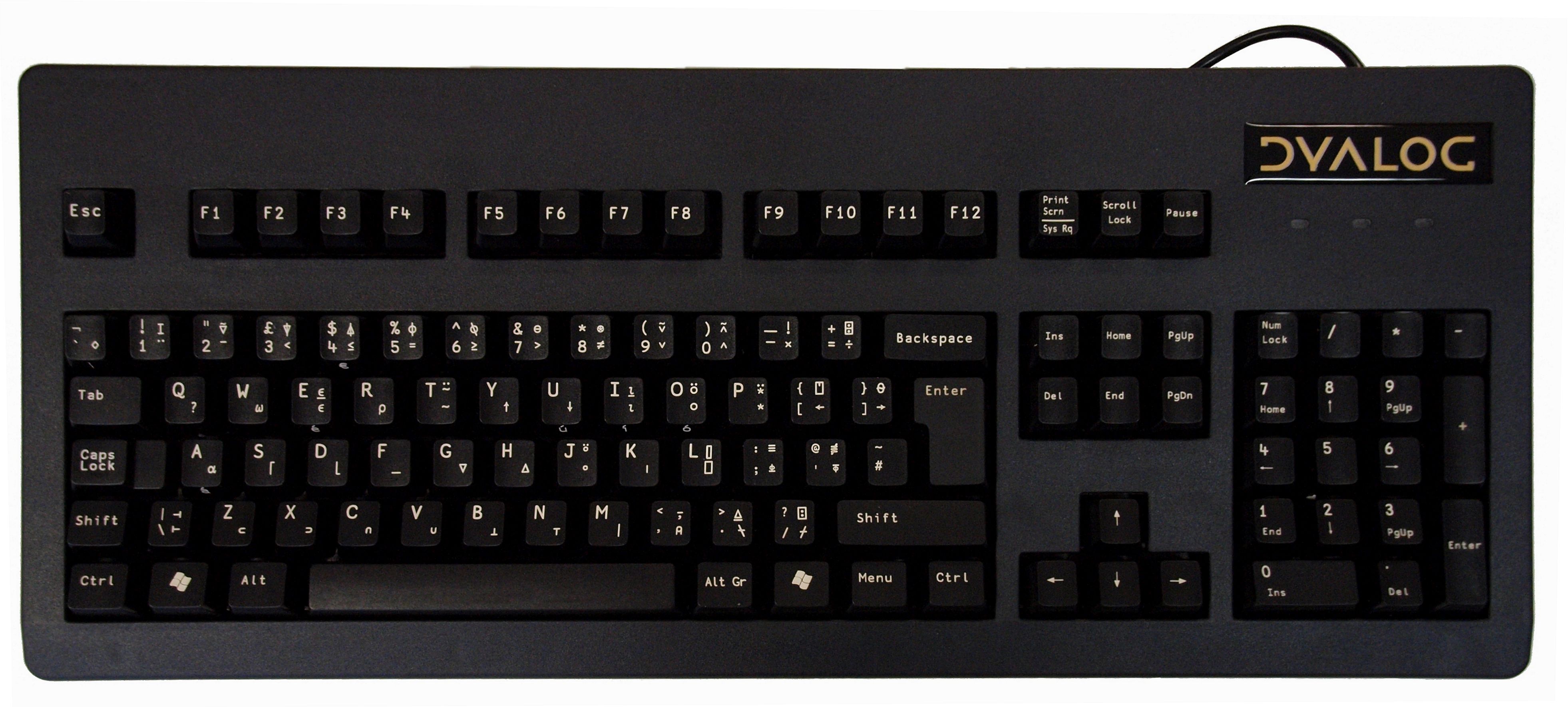
As you probably know, I’m technically a sole trader and have had the need to crunch numbers, and have also done so in research projects I’ve pursued for CPD (Continuing Professional Development). Most of this I’ve done using pen and paper because that way I feel more in control. When I’ve felt the need to do the same in a more automated way, I’ve used a programming language called APL – “A Programming Language”. This was formerly known as Iverson Notation, and consists of terse strings of symbols, letters and numbers which can be used to perform remarkably involved calculations on large sets of numbers. It’s also been described as a “write-only language” because although the programmer might understand what the sequent does, the chances are nobody else will. In this respect it resembles a particular style of writing FORTH, another language which appeals strongly to me. However, FORTH can be easily rendered more legible by choosing meaningful names for words, constants and variables, and commenting more extensively within the definitions. The same doesn’t apply to APL. This sequent is taken from the Wikipedia article on the language:
x[⍋x←6?40]
It generates six pseudo-random integers between one and forty which are guaranteed not to repeat. If I wanted to do that in BASIC, it would take many lines of code. All reserved words, if that’s the right way to describe them, in APL consist of a single character although many of those are achieved by overstriking – you type a character, backspace back onto it and type another which is then superimposed. APL uses symbols now available in Unicode but usually not in ASCII, so it was necessary to use both a special keyboard and character set for it. One idiosyncracy of APL is that, like the RPN calculator introduced above, it doesn’t have operator precedence. Sequents are just interpreted from right to left, as I recall.
APL used to have a reputation for using up a lot of memory, as it was oriented towards vector processing and this involved dealing with large data sets. This is of course by the standards of the day, and since it actually dates from 1957 and wasn’t originally designed as a computer programming language, this is no longer an issue. A replacement ROM and keyboard plus 64K RAMPack was offered for the ZX81 to enable APL to be used relatively inexpensively (£300 in 1982), but this, like the Arabic language ROM, seems to have been lost to history. On the subject of foreign languages, APL is also a leveller because it isn’t “in English”, unlike most other programming languages. Someone with no written knowledge of the English language would not be at a disadvantage compared to someone who was fluent.
What I’m working up to saying is that this is another possible route to a device which could be called a “Mathbox”. Today’s devices are highly overpowered compared to the kind of machine needed to run APL. They don’t need high resolution graphics, sound, a pointing device or all sorts of other things to do it. All they need is a keyboard, storage, a power supply and a monitor, and their size would be dictated by the size of the interfaces rather than the hardware. A standard keyboard could be used, wireless or USB, although clearly a specialised APL keyboad would be better. These do exist. A micro-SD card could be used for storage and a mini-HDMI socket for display. I envisage this last providing a green on black eighty column display on a 1920 x 1080p monitor, which would in proportion be 80×45, occupying only 3.5Kb of video RAM. Many of the functions could be realised in hardware, perhaps via a FPGA. A limited degree of firmware might be desirable but it wouldn’t need to be very extensive, particularly since the machine code could be optimised for APL. It would also be ludicrously fast because it wouldn’t get bogged down using system resources to run the GUI or multitask.
This, then, is the other, modern Mathbox. It has things in common with the original, such as the compromise between usability and simplicity, and is therefore worthy of the name.
There you go then. And to think this all came out of a simple typo I made yesterday.
 A Box Of Chocolates